Liga MX is officially in the current FC Mobile game
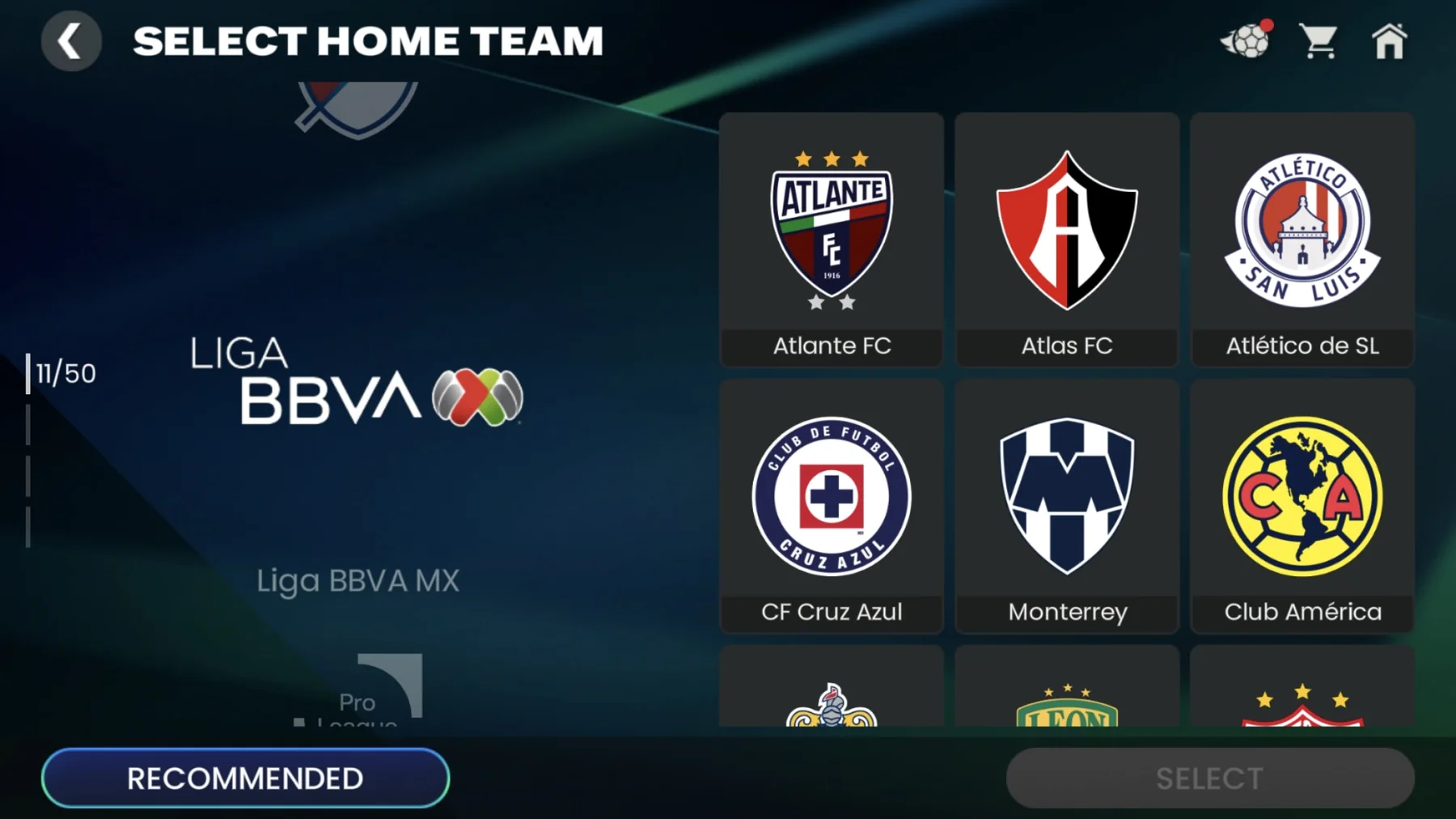
Yes. Liga MX is officially represented in the current EA Sports FC Mobile game. As of October 19, 2026, EA's Mexican FC Mobile website promotes licensed Mexican clubs and players and displays a Liga BBVA MX club-selection screen. This is a different answer from the question about the older FC 26 console and PC release.
For supporters, the important next question is what being in the game allows you to do. An authentic club selection, an individual player item, a squad-building challenge and a complete domestic season are different experiences. A licence can make club identities available without turning every mode into the real Mexican championship. Start with the mode you want, then check its choices.
The league's sponsored name, Liga BBVA MX, refers to the same Mexican top division normally shortened to Liga MX. Do not mistake the longer label for an additional league or a separate phone game. Likewise, FC Mobile 27 is the current seasonal branding of the Mobile experience; the number does not make its features identical to those of the annual console title.
The July announcement and September update tell different parts of the story
EA's July 24, 2026 partnership announcement set out the licensing scope: official clubs, kits, crests and players, with themed content and experiences to follow. Its forward-looking headline reflected the moment when the agreement was announced. It should not outweigh the current product page when asking whether Liga MX is available now.
The September 24 FC Mobile 27 update notes provide the newer season context. For someone returning after months away, reading only the July news can leave the impression that the league is still an unfulfilled announcement. Reading only an old FC 26 discussion creates a different mistake: assuming the phone game shares the older console game's league list.
Use the current app and official Mobile pages together. If your real question is whether a PS5 or PS4 copy of FC 26 contains the league, see our FC 26 Liga MX guide. Installing the Mobile update does not change that separate game's content.
Choose between authentic clubs, player items and social Leagues
Choose an authentic club for a club-versus-club match, use individual items to assemble your own squad, and join a social League to play alongside other users. These are three different uses of football content. Understanding that distinction is more helpful than searching every menu for the same Liga MX label.
For example, a supporter who wants América against Cruz Azul with a friend is asking for a different setup from someone collecting players who have represented both clubs. Another supporter may want an online community of fellow Mexican fans. All three can enjoy the game without those activities becoming the same competition.
Quick Match is the place to check authentic club choices
EA's Quick Match guide explains that Classic Teams let users play with authentic clubs and national sides, alongside the option of their own team. Its May 2026 instructions locate Quick Match under Play and Division Rivals. Menu placement can change, so use the current screen labels if your updated app looks different.
For the Mexican clubs, combine those mode instructions with EA's current Liga BBVA MX selection image. The current menu is the useful place to inspect available clubs and choose the matchup you want. If a club name does not appear where expected, establish whether you have opened authentic-team selection rather than your collected-player squad.
Quick Match also supports inviting friends through a match lobby. Agree on the team type before sharing the match details: an authentic-club game and a game using two personally assembled squads can produce very different expectations about ratings and personnel.
Ultimate Team uses individual player items
Ultimate Team is the squad-building route. You assemble a side from player items rather than receiving every member of a real club simply by selecting its badge. A Liga MX licence makes the football identities meaningful; it does not promise that every desired card is immediately obtainable, currently offered in an event or available through the same route.
Be precise when following a player recommendation. Name, position, item version and acquisition method matter more than a cropped overall-rating image. If the goal is a themed Mexican-club squad, decide whether that means current players only or a broader collection of former favourites. That is your squad's identity, and it should guide purchases more than an unrelated headline rating.
A social League is not the Mexican domestic competition
EA's Mobile Leagues help describes groups of users with members, administrators and shared activities. Joining a League with a Mexican name therefore means joining a community. It does not enter your squad into the real Liga MX fixture list.
A fan community can still be useful for arranging friendlies and discussing team choices. Read its participation expectations before joining. For actual club positions, use the real Liga MX standings; a social leaderboard measures something entirely different.
Licensing does not promise a full Liga MX career season
Do not read the Liga MX licence as a promise of a complete domestic managerial career in FC Mobile. The official material establishes authentic Mexican club content; the mode descriptions establish how particular matches and challenges work. Neither a badge nor a team-selection screenshot proves that the game recreates every stage of a Mexican season.
This matters most for a supporter whose dream is taking a club through two short tournaments, managing a squad across campaigns and reaching a Mexican final. That is a more demanding request than playing one authentic matchup. Before committing time or money, look for a specific mode description that meets that request.
Apertura, Clausura and Liguilla need more than club badges
The FMF competition regulations for 2026–27 identify the Apertura 2026 and Clausura 2027 as the season's two tournaments. The Liguilla is the knockout championship stage familiar to Mexican supporters. Faithfully reproducing that experience involves competition progression and rules, as well as the teams' appearance.
A friendly ending on penalties can be entertaining without representing a real Liguilla tie. A custom set of club matches can recreate a rivalry without maintaining a domestic table. Those distinctions are not a criticism of quick football games; they describe why different players may want different products.
If a long club career is your priority, compare the current annual game's modes and known issues through our FC 27 Liga MX guide. Use the real 2026–27 season guide to understand the football structure you want the game to represent.
Gauntlet and themed events serve different purposes
EA's Gauntlet deep dive describes escalating rounds, match objectives and restrictions on player-item appearances. It is a squad-management challenge that encourages rotation. A challenge involving Mexican players would therefore still need to be understood through its own rules, rather than assumed to be a Liga MX season.
Likewise, a themed campaign can celebrate a league through items or tasks without reproducing its calendar. Check what the event asks you to do, which squad it uses and how progress is measured. A supporter assembling a club-themed collection may find that enjoyable even if another supporter seeking an authentic season would choose differently.
The clearest test is practical: describe the evening you want to spend playing. One rivalry match, a run of rotating-squad challenges and a multi-season club career are distinct plans. Look for the mode that supports your plan instead of making the licence announcement carry more meaning than it contains.
Build a Mexican club squad without chasing outdated rewards
Build a balanced squad around the players and club identity you enjoy, and verify today's acquisition conditions before chasing a reward shown in an old video. Liga MX's arrival does not make every Mexican-club item permanent, free or interchangeable. The card currently available to you is the one that matters.
Begin with a formation that has sensible roles for your collection. A supporter building an all-club side may need to accept a lower overall rating in one position to preserve the theme. A supporter building a competitive mixed squad may choose a different compromise. Neither approach requires pretending that the highest rating automatically creates the most satisfying team.
EA's player improvement guide distinguishes training, which improves attributes, from ranking, which raises overall rating. Check the current requirements in your app before applying resources. A screenshot of an upgraded player may therefore describe an investment already made, rather than the item you would obtain at its starting state.
Check the item, position and acquisition route before spending
Open the full item details. Confirm the player's version, position, relevant attributes and whether your intended mode allows that item. Then inspect the actual route to obtain it. A card appearing in someone's collection is not a guarantee that you can buy the same version immediately, or that a previous event still offers it.
EA's Drafts guide explains how to inspect available player pools through the More button. Use the displayed pool and conditions rather than assuming a Mexican player is included because the overall event celebrates football. A guarantee relating to a pool is also different from a guarantee of your particular favourite player.
Check timers and exchange conditions before committing items. The official Drafts explanation notes that phase tokens expire and that progress does not carry across every event or voucher type. Those details are more useful than copying an old creator's spending sequence, especially when a phone game has already moved into a newer season.
For a club-themed project, protect the pieces you intend to keep and fill the least functional positions first. Keep a reserve option for challenges that demand rotation. This makes the squad usable as well as recognisable, and avoids spending the entire budget on one attractive card while leaving the rest of the team unable to support it.
Update the right app and check the experience you want
Use the current official FC Mobile app, then check the relevant mode and club menu. If Mexican content appears to be missing, those checks are more useful than immediately assuming that the licence announcement was false or that a paid upgrade is required.
Keep the problem specific. An absent club choice, a missing player item and an expired event are different issues. Write down which one you mean before changing settings or seeking help. That makes it much easier to compare your experience with an official announcement or another player's current screen.
iOS and Android use the Mobile game, not the FC 26 console release
Download or update through EA's official links to the App Store or Google Play. The phone game's content and seasonal update are distinct from buying FC 26 or FC 27 for a console. A Companion app used to manage another game's squad is also not the same question as playing FC Mobile itself.
Device compatibility matters after a major update. EA's current system-requirements guide explains that supported hardware can change. Check that guide for your actual phone rather than copying a years-old minimum-specification list. A device unable to run the current app will not be fixed by looking for a Mexican-league download.
Before changing devices or making major app changes, follow EA's account-linking guidance so that progress is associated with the appropriate account. Do not remove an installation in the hope of forcing new club content without first understanding how your progress is saved.
Use current club menus and official notices to resolve missing content
First confirm the installed app is updated. Next inspect authentic-team selection in the intended mode, rather than searching only your owned player items. Then check whether the feature you saw was part of a limited event, a beta demonstration or the current live game. A video can be genuine while describing a different experience.
If the issue persists, use official FC Mobile support. Describe the platform, app version, mode, missing club or item and any error message. Those details help distinguish an interface question from an account-specific problem. A password or a purchase from an unrelated seller is not part of verifying whether a club appears in a menu.
When taking the interest back to real football, our games today page and TV schedule follow the actual clubs. The game can provide a new way to enjoy those identities; current fixtures, real squads and the phone game's items should still be checked in their own contexts.
Comments
Comments are reviewed before publication.
Sign in with Google to comment. Spam, abusive content, personal information and policy-violating links are not published.
Sign in with Google to comment or reply.
Loading comments…